
2.8 KiB
2.8 KiB
Branching and Code Review Process
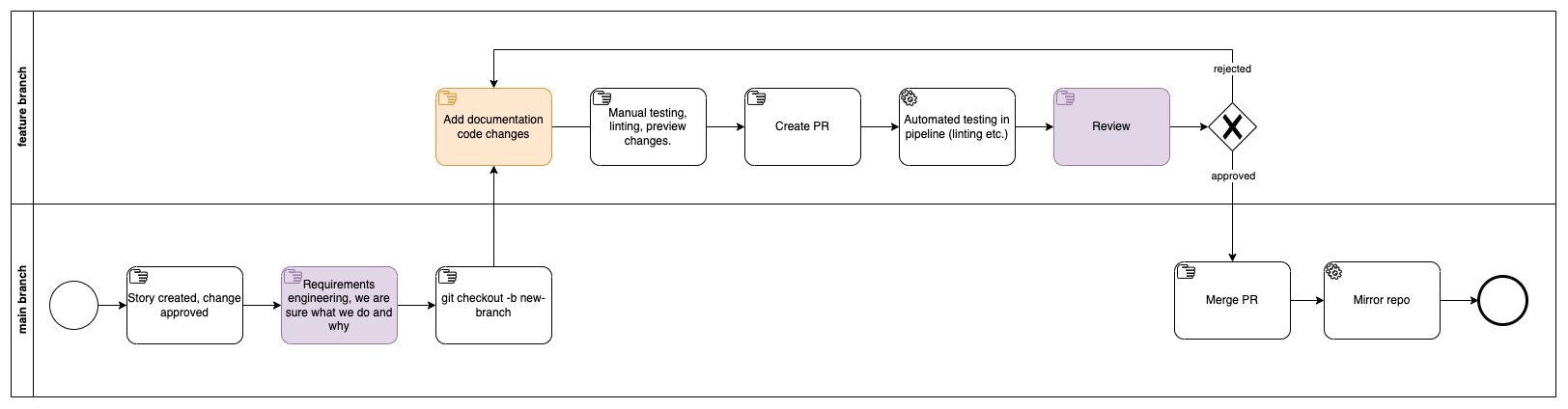
This document outlines the guidelines and expectations for effective code branching, review, and merging within a regulated Azure DevOps environment. Emphasis is placed on the four-eyes principle and traceability of changes.
Traceability
- Utilize Azure Boards for work item tracking, linking commits and PRs to their respective items.
- Enforce policies in Azure Repos to require reviews, approvals, optionally linked work items for merges.
- Use annotations in your code for significant changes, providing explanations and linking back to documentation or specs.
Create a Branch
- Create branches under subfolders aligned with their purpose (
new,update,fix,delete) following the semantic versioning linked with release notes documentation. - Use descriptive branch names that reflect the feature or fix.
Apply Changes
- Commit changes regularly with clear, concise messages that follow semantic versioning.
- Include work item or issue numbers in commit messages for traceability.
Manual Testing
- Perform local linting to ensure code quality.
- Preview changes locally, especially for UI-related updates.
- Run unit tests and ensure they pass before pushing code.
Create a Pull Request
- Rebase your branch on the latest main branch to simplify the review process and prevent conflicts.
- Ensure your PR description is detailed, linking back to any related work items or issues for context.
- Tag relevant team members for review and set a deadline if necessary.
Automated Testing
- Optional part, automated tests can be defined within a pipeline that is triggered automnatcally when a Pull Request is created.
- Ensure all automated tests pass, including unit, integration, and end-to-end tests.
- Check for code coverage and ensure it meets the project's standards.
Review a Pull Request
- Focus on maintainability, readability, and scalability of the code.
- Ensure new code adheres to project standards and integrates well with existing codebase.
- Provide constructive feedback, highlighting both strengths and areas for improvement.
Merge a Pull Request
- Ensure all PR checks pass (build, test pipelines, and any additional checks your team requires).
- Only merge after at least one other team member has approved the changes.
- Upon merging, the main branch triggers a CI/CD pipeline to deploy changes to a staging environment for further testing.
Post-Merge
- Delete the feature branch to keep the repository clean and manageable.
- Update any project tracking tools to reflect the completion of tasks.
- Review deployment results and ensure no issues in the staging environment before promoting to production.